


Description
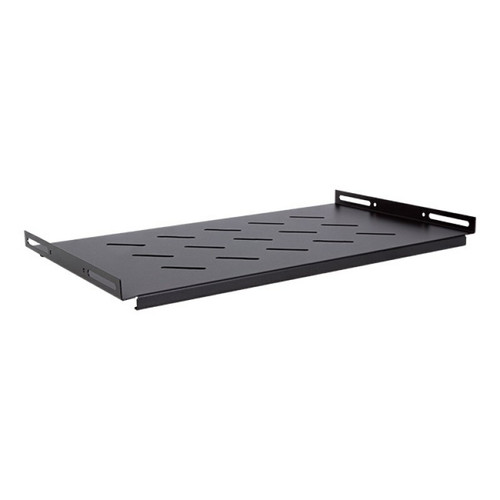
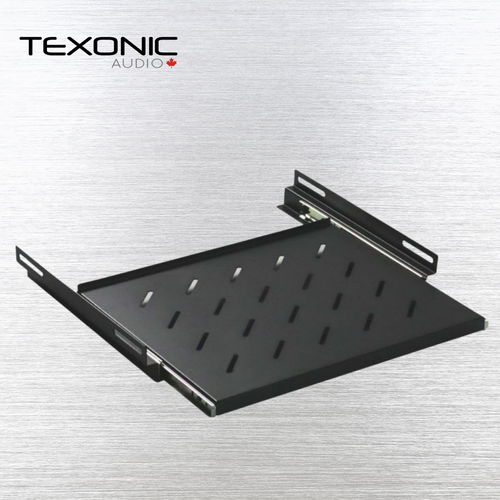
Add convenient pull-out access for a keyboard, mouse or other suitable device with the SR5420 19-inch sliding rack shelf.
The metal tray slides out when needed and stores inside the rack when not in use. Its 19-inch width and 16.5-inch depth make it a practical accessory for compatible network racks, AV racks, equipment cabinets, control systems and technical workstations.
| Model / SKU | SR5420 |
|---|---|
| Product Type | Sliding rack shelf |
| Listed Tray Size | 19 in wide × 16.5 in deep |
| Construction | Metal |
| Intended Use | Keyboard, mouse and other suitable devices |
Pull-Out Access Inside a 19-Inch Equipment Rack
The SR5420 creates a convenient working surface inside a compatible rack enclosure. Pull the tray forward to use a keyboard and mouse, complete equipment setup or access a temporary device. Slide it back into the rack when the task is complete.
This arrangement can help reduce desktop clutter and keep essential peripherals close to the network, AV or control equipment they operate.
Product Benefits
- Slide-out design provides easier access to rack peripherals
- Stores inside the rack when the work surface is not required
- 19-inch listed width suits compatible rack applications
- 16.5-inch depth provides usable space for suitable devices
- Metal construction supports regular rack-room use
- Useful for keyboards, mice and temporary service equipment
- Helps reduce loose peripherals around the equipment rack
- Suitable for compatible IT, network, AV and control-system installations
Common Uses
| Application | Typical Purpose |
|---|---|
| Network Rack | Local keyboard and mouse access for switches, servers or network equipment |
| AV Equipment Rack | Temporary control surface for programming and system configuration |
| Server or Equipment Room | Pull-out work area for maintenance and troubleshooting |
| Security System Rack | Keyboard or mouse access for compatible recording and monitoring equipment |
| Control System | Convenient access to a suitable controller, laptop or peripheral |
What to Check Before Choosing a Sliding Rack Shelf
Sliding rack shelves can differ in rack-unit height, mounting depth, rail configuration, load capacity and locking design. Confirm the following measurements for the SR5420 and your rack before installation:
- Rack width: Confirm the enclosure uses compatible 19-inch rack rails.
- Rack depth: Ensure the cabinet has room for the 16.5-inch tray and slide mechanism.
- Mounting rails: Check whether the rack and shelf require front-only or front-and-rear support.
- Rack space: Confirm the vertical rack-unit space needed by the physical shelf.
- Device size: Measure the keyboard, mouse and any other item placed on the tray.
- Device weight: Obtain the approved shelf capacity before placing heavier equipment on it.
- Door clearance: Check that rack doors can close when the tray is stored.
- Slide clearance: Leave clear working space in front of the rack.
- Cable travel: Allow sufficient cable length for the tray to move fully.
Sliding Shelf or Fixed Rack Shelf?
| Shelf Type | Best Use |
|---|---|
| Sliding Shelf | Keyboard, mouse or equipment that requires regular front access |
| Fixed Vented Shelf | Equipment that normally remains stationary and benefits from airflow |
| Rack Drawer | Tools, adapters or accessories that need enclosed storage |
Keyboard, Mouse and Device Fit
Measure the complete keyboard and mouse arrangement before ordering. Include space for wrist rests, cable connectors, wireless receivers and the movement needed to operate the mouse comfortably.
Devices should rest securely within the tray area without unstable overhang. Do not place heavy equipment on the shelf until its approved load capacity has been confirmed.
Plan Cable Movement
A wired keyboard or mouse requires enough cable length to travel with the shelf through its complete sliding range. Route cables so they cannot catch on rack equipment, rails, door hardware or sharp metal edges.
Wireless peripherals can reduce moving cable requirements, but their receivers and power or charging connections must still remain accessible.
Rack Installation Checklist
- Confirm the rack uses compatible 19-inch mounting rails.
- Measure available internal rack depth.
- Determine the shelf’s required vertical rack space.
- Inspect the rail and mounting-hole arrangement.
- Check front-door and rear-equipment clearance.
- Secure all required mounting points.
- Test the tray movement without equipment.
- Route peripheral cables with adequate slack.
- Place equipment on the tray only after confirming secure operation and load suitability.
Technical Specifications
| Model / SKU | SR5420 |
|---|---|
| Description | Sliding shelf for compatible 19-inch racks |
| Listed Width | 19 in |
| Listed Depth | 16.5 in |
| Shelf Operation | Sliding / pull-out |
| Material | Metal |
| Intended Devices | Keyboard, mouse and other suitable devices |
| Rack-Unit Height | Not specified—measure before ordering |
| Load Capacity | Not specified—confirm before loading |
| Rail Configuration | Not specified—inspect rack and shelf mounting points |
Frequently Asked Questions
What is the listed tray size?
The current listing specifies a 19-inch width and 16.5-inch depth.
Can it hold a keyboard and mouse?
Yes. Keyboard and mouse use is listed, provided both devices fit safely on the tray.
Does the shelf slide into the rack?
Yes. It uses a slide-out design for access and storage.
Is it a vented equipment shelf?
The current listing describes a sliding metal tray but does not state that it is vented.
What is the maximum load capacity?
A maximum load is not published on the current listing. Confirm the approved capacity before placing heavier equipment on it.
Is it a 1U or 2U shelf?
The rack-unit height is not listed. Measure the physical shelf and available rack space before ordering.
Does it fit 2-post and 4-post racks?
The rail configuration is not specified. Compare the shelf mounting points with the rack before purchase.
Can it support a laptop or monitor?
Only after the device dimensions and weight have been checked against the shelf’s verified usable area and approved load capacity.
Complete Your Rack Installation
Compare sliding and fixed shelves or browse rack cabinets, blank panels and accessories for compatible network and AV installations.
Rack Cabinets & Accessories 2U Vented Rack Shelf 1U Fixed Rack Shelf 1U Blank Panel