


Description
```html
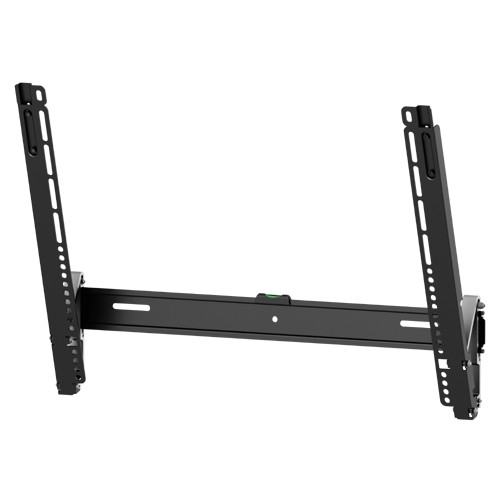
Create a clean, close-to-the-wall TV installation with the TEXONIC AX46 ultra-slim tilt TV wall mount.
Designed for most 37–70-inch flat and curved TVs, the AX46 positions a compatible display approximately 30 mm or 1.2 inches from the wall. Its tool-free tilt, lateral adjustment and quick-release locking system make installation and final positioning easier.
| Recommended TV Size | Most 37–70-inch displays |
|---|---|
| Maximum Load | 35 kg / 77 lb |
| Maximum VESA | Up to 600 × 400 mm |
| Tilt Adjustment | Up to −12° downward |
| Wall Profile | 30 mm / 1.2 in |
| Mount Type | Ultra-slim tilting TV wall mount |
Ultra-Slim TV Wall Mount for 37–70 Inch TVs
The TEXONIC AX46 is designed for installations where a clean, low-profile appearance is important. Its slim 30 mm mounting depth keeps the television close to the wall without the bulk of an articulating arm.
The AX46 is suitable for living rooms, bedrooms, home theatres, offices, boardrooms, classrooms, reception areas, restaurants and commercial display installations.
Product Features
- Recommended for most 37–70-inch flat and curved televisions
- Supports compatible displays weighing up to 35 kg or 77 lb
- Slim 30 mm profile creates a clean, close-to-wall appearance
- Tool-free −12° tilt adjustment helps improve the viewing angle
- Lateral-shift brackets allow easier horizontal alignment
- Fine-tuning adjustment helps correct the final screen position
- Automatic spring locks securely attach the TV brackets
- Quick-release cords simplify future TV removal
- Magnetic strap ends remain hidden when not in use
- Detachable panel design supports easier installation
Only 30 mm from the Wall
The AX46 positions a compatible television approximately 30 mm or 1.2 inches from the wall. This ultra-slim profile helps create a picture-frame-style installation with less visible mounting hardware.
Before mounting the television, check that the power connection, HDMI ports, antenna connection and network ports have enough clearance. Right-angle cables or recessed wall connections may be helpful with a close-to-wall installation.
Tool-Free −12° Tilt Adjustment
The tool-free tilting mechanism allows the television angle to be adjusted without removing the display or using additional tools. Up to 12° of downward tilt may improve viewing when the TV is installed above normal eye level.
Tilting may also help reduce reflections from overhead lights or windows. The AX46 is a tilting wall mount and does not extend or swivel like a full-motion bracket.
Lateral Shift and Fine-Tuning Adjustment
The lateral-shift brackets allow the television to move horizontally across the wall plate. This can help centre the display when the wall studs are not positioned directly behind the desired screen location.
The built-in fine-tuning adjustment also helps correct minor post-installation alignment, making it easier to achieve a level and balanced screen position.
Automatic Locking and Quick Release
Automatic spring locks help secure the television brackets to the wall plate when the display is lowered into position.
Quick-release cords allow the brackets to be unlocked when the television needs to be removed. Magnetic strap ends help keep the release cords out of sight during normal use.
TV and VESA Compatibility
The AX46 supports several common VESA mounting-hole patterns. Compatibility must be confirmed using the television manufacturer’s specifications before installation.
| VESA Pattern | Mounting-Hole Spacing |
|---|---|
| VESA 200 × 200 | 200 mm horizontal × 200 mm vertical |
| VESA 300 × 200 | 300 mm horizontal × 200 mm vertical |
| VESA 300 × 300 | 300 mm horizontal × 300 mm vertical |
| VESA 400 × 200 | 400 mm horizontal × 200 mm vertical |
| VESA 400 × 300 | 400 mm horizontal × 300 mm vertical |
| VESA 400 × 400 | 400 mm horizontal × 400 mm vertical |
| VESA 600 × 400 | 600 mm horizontal × 400 mm vertical |
- Confirm the television weighs no more than 35 kg or 77 lb
- Confirm the VESA pattern matches one of the supported sizes
- Check that the mounting arms fit the television’s rear panel
- Confirm the arms do not block power, HDMI or network ports
- Verify the supplied TV screws have the correct diameter and length
- Use suitable spacers for recessed, uneven or curved rear panels
Recommended Applications
| Application | Typical Use |
|---|---|
| Living Room or Home Theatre | Clean, close-to-wall television installation |
| Bedroom or Condo | Space-saving TV installation with downward tilt |
| Office or Boardroom | Presentation and video-conference display |
| Reception or Waiting Area | Information, entertainment or news display |
| Retail or Commercial Space | Digital signage and customer information |
Wall Installation Guidelines
Install the AX46 on a wall structure capable of supporting the combined weight of the television and wall mount. The mounting fasteners must be suitable for the specific wall construction.
- Do not secure the mount to unsupported drywall alone
- Locate the centre of suitable wood studs before drilling
- Use masonry fasteners only in suitable solid concrete or brick
- Keep the wall plate level before tightening the fasteners
- Check electrical-outlet and cable clearance before mounting
- Use two people to lift and position the television
- Confirm the automatic locks are fully engaged before releasing the TV
Technical Specifications
| Brand | TEXONIC |
|---|---|
| Model / SKU | AX46 |
| Product Type | Ultra-slim tilt TV wall mount |
| Recommended TV Size | Most 37–70-inch displays |
| Curved-TV Compatibility | Compatible with many curved televisions |
| Maximum Load Capacity | 35 kg / 77 lb |
| Tilt Range | Up to −12° downward |
| Distance from Wall | 30 mm / 1.2 in |
| Screen-Level Adjustment | Approximately 3/8 in |
| Supported VESA Patterns | 200 × 200, 300 × 200, 300 × 300, 400 × 200, 400 × 300, 400 × 400 and 600 × 400 mm |
| Panel Type | Detachable panel |
| Tilt Adjustment | Tool-free adjustment |
| Locking System | Automatic spring locks with quick-release cords |
| Positioning | Lateral-shift and fine-tuning adjustment |
What’s Included
- 1 × TEXONIC AX46 ultra-slim tilt TV wall mount
- Installation hardware kit
- Samsung-compatible TV mounting screws
- Instruction manual
Frequently Asked Questions
Will the AX46 fit my television?
It will fit when the TV weighs no more than 35 kg or 77 lb, uses one of the supported VESA patterns and has suitable rear-panel and cable clearance.
How close will the TV sit to the wall?
A compatible television sits approximately 30 mm or 1.2 inches from the wall, depending on the rear-panel shape and spacers used.
Can the tilt be adjusted without tools?
Yes. The AX46 uses a tool-free mechanism for up to approximately 12° of downward tilt.
Does the mount swivel or extend?
No. The AX46 is an ultra-slim tilting mount. It does not extend or swivel like a full-motion bracket.
Can the TV be moved sideways after installation?
The lateral-shift brackets provide limited horizontal adjustment across the wall plate to help centre the television.
Is the AX46 compatible with curved TVs?
It is compatible with many curved televisions when their weight and VESA pattern are supported and suitable spacers are used.
Can it be mounted directly onto drywall?
No. The mount must be secured to suitable structural support, such as wood studs or an appropriate solid masonry wall.
How is the TV removed from the mount?
Pull the quick-release cords to disengage the automatic spring locks, then lift the television from the wall plate with two people.
Complete Your TV Installation
Explore additional TV wall mounts, cable-management products and HDMI accessories for home and commercial installations.
View TV Wall Mounts Cable Management HDMI Products HDMI Cables
IMPORTANT! Please note that only the TV screen sizes (37" to 70") listed are approximations. Also, please check the VESA pattern and weight (without a stand) on your product manual to ensure that this mount will be compatible with your Monitor/TV.