


Description
Move the Screen When the Room Requires It
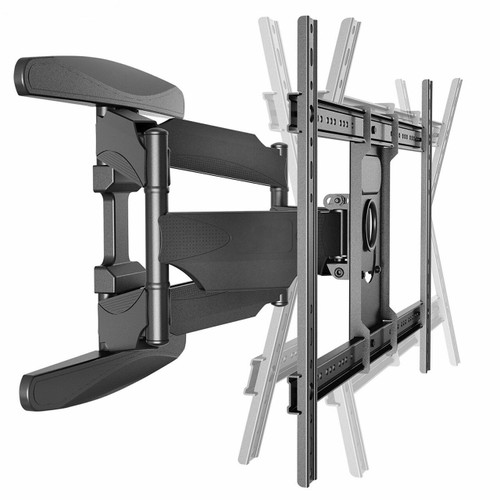
The TEXONIC XP6 is a full-motion TV wall mount for installations where the television needs more than a fixed position.
Extend the screen away from the wall, turn it toward a different seating area, adjust the viewing angle, then return it closer to the wall when finished. It is a practical choice for living rooms, offices, boardrooms and other spaces where the best viewing position may change throughout the day.
| Most 40–75" TVs | Up to 100 lb / 45.5 kg |
| VESA 200×200 – 600×400 | Approx. 19.7" Extension |
Why Choose a Full-Motion Mount?
Different Viewing Positions
Turn the television toward a sofa, dining area, workstation or other viewing position instead of keeping the screen pointed in one direction.
Better Access Behind the TV
Extend the television away from the wall when you need access to HDMI, network, antenna or other rear connections.
Adjust After Installation
Tilt, swivel and minor levelling adjustment give the installer more flexibility when setting the final screen position.
Clean Position When Retracted
When not being repositioned, the mount folds back to approximately 2.3 inches from the wall for a more compact installation.
TV screen size alone does not determine wall-mount compatibility.
Position the TV Around Your Space
| Extend | Move the TV up to approximately 19.7 inches away from the wall. |
| Swivel | Turn the display left or right to face different viewing areas. |
| Tilt | Adjust from approximately −8° downward to +5° upward. |
| Level | Fine adjustment helps correct minor screen alignment after mounting. |
Where the XP6 Works Best
Living Rooms — redirect the screen toward different seating areas.
Open-Concept Spaces — view one television from more than one part of the room.
Offices & Boardrooms — reposition a display for meetings or presentations.
Waiting & Reception Areas — aim the display toward the main viewing area.
Commercial Displays — useful where screen direction or service access may need to change.
Building multiple TV installations? Make the XP6 part of your standard mount inventory. Buy a 10-pieces and receive installer discount pricing. A consistent mount choice makes it easier to plan repeat installations for offices, commercial projects, rental properties and multi-display jobs. Contact AVTECK for installer and project pricing.
Key Specifications
| Brand | TEXONIC |
| Model / SKU | XP6 |
| Mount Type | Full-motion articulating TV wall mount |
| Recommended TV Size | Most 40–75 inch TVs |
| Maximum Load | 100 lb / 45.5 kg |
| VESA Compatibility | 200×200 to 600×400 mm |
| Tilt | Approx. −8° to +5° |
| Swivel | Up to approximately ±180°, installation dependent |
| Levelling Adjustment | Approx. ±4° |
| Maximum Extension | Approx. 19.7 in / 500 mm |
| Retracted Profile | Approx. 2.3 in / 58 mm |
| Cable Management | Integrated cable-management covers |
What's Included
Installation Manual
Review the installation manual before mounting the television. The TEXONIC XP6 manual includes English and French instructions, hardware information and adjustment diagrams.
Complete the TV Installation
Build the installation in this order so the mount, signal connections and cable routing work together.
Shop HDMI Cables →
Shop HDMI Products →
Shop Cable Management →


